Veo 4 API
Cinematic Veo 4 rendering on fal.ai
10 guides covering Veo end to end. Real shot lists, real numbers, real code. Dated and opinionated.
Everything you need to ship cinematic video with Veo 4.

Frequently asked.
No. 01How much does Veo 4 cost on fal.ai?
Veo 4 on fal-ai/veo4/text-to-video runs at roughly $0.75 per second at 720p 24fps, which puts a full 8 second cinematic beat at about $6.00. A 1080p render on the same endpoint costs closer to $1.25 per second, so the same 8 second job lands near $10. Image to video pricing on fal-ai/veo4/image-to-video tracks the same per second scale. Rates move quarterly, so check fal.ai/pricing before you quote a client. For cost math on a specific shot count, multiply your planned seconds by the resolution rate and add a 10 percent buffer for retries.
No. 02How do I get a fal API key and authenticate against fal-ai/veo4/text-to-video?
Sign up at fal.ai, generate a key from the dashboard, and drop it into your environment as FAL_KEY. From there, @fal-ai/client picks it up via fal.config({ credentials: process.env.FAL_KEY }) and every call to fal.subscribe('fal-ai/veo4/text-to-video', ...) authenticates automatically. In production, never hardcode the key; inject it through Vercel, Railway, or whichever runtime you use. Free signup credits cover your first few renders, and you can watch spend in real time on the cost dashboard before wiring Veo 4 into a client pipeline.
No. 03What resolutions does Veo 4 support?
On fal-ai/veo4/text-to-video, the ceiling is 1080p and the floor is 720p. 720p jobs cost near $0.75 per second and are the right default for social cuts and internal review. 1080p jobs are the pick for broadcast deliverables, and the per second rate rises accordingly. 4K upscaling is a post step today, not a native option. Aspect ratios cover 16:9, 9:16, and 1:1, which covers landscape hero cuts, vertical social, and square for feeds. Frame rate is fixed at 24fps, which matches cinematic delivery without a frame rate conversion pass.
No. 04What is the maximum duration per render?
A single call to fal-ai/veo4/text-to-video renders up to 8 seconds. To produce longer sequences, chain shots by feeding the last frame of your first render into fal-ai/veo4/image-to-video and prompting the next beat. Veo 4 holds shot coherence well across a chain because its camera and grade controls stay consistent when you pin the same lens vocabulary across prompts. Plan your edits around the 8 second ceiling; for a 30 second spot, budget four Veo 4 renders plus a stitch pass in your NLE or in ffmpeg.
No. 05How do I call Veo 4 from Python?
Install fal-client, set FAL_KEY in your environment, and call fal_client.subscribe('fal-ai/veo4/text-to-video', arguments={'prompt': '...', 'aspect_ratio': '16:9', 'duration_seconds': 8}). The Python SDK mirrors the TypeScript @fal-ai/client one to one, so the same input schema applies. For async jobs, use fal_client.submit and poll the queue with the returned request id. Both SDKs support webhook callbacks so you can push queue completion events to your own service instead of polling. Python is the right pick when Veo 4 sits inside a Django or FastAPI pipeline.
No. 06Does Veo 4 support image to video on fal.ai?
Yes. fal-ai/veo4/image-to-video accepts a still frame as input and animates it with a prompt, preserving the subject and grade from the source image while adding motion, camera path, and optional dialogue cues. Pricing matches fal-ai/veo4/text-to-video per second. This is the endpoint to use when you want to animate a client-approved still, extend a plate from a physical shoot, or chain consecutive 8 second beats by feeding the final frame of one render into the next. Aspect ratio inherits from the source unless you explicitly override it.
No. 07What happens if a Veo 4 job fails or times out?
fal-ai/veo4/text-to-video runs through fal.ai's async queue, so failures return a structured error with a request id you can inspect via fal.queue.status. Default timeouts land near 10 minutes for 1080p renders; if a job exceeds that, the queue marks it failed and your credits for that submission are refunded. The right retry pattern is to catch the error, log the request id, and resubmit with a slightly softened prompt if the failure was a content filter hit. For transient queue errors, a single retry with exponential backoff resolves most cases.
No. 08Can I wire Veo 4 renders to a webhook instead of polling?
Yes. fal-ai/veo4/text-to-video accepts a webhook_url on fal.queue.submit, and fal.ai posts the completion payload to that URL the moment the render lands. This is the right pattern for any production pipeline where you do not want a long lived connection. Your webhook handler receives the video URL, the request id, and the billing seconds used. Pair this with a signed secret on your endpoint to verify the callback origin. Webhooks cut queue polling overhead to zero and scale cleanly when you run dozens of renders in parallel.
No. 09How does Veo 4 compare to Kling 3.0 Pro, Seedance 2.0, and Grok Imagine?
Veo 4 on fal-ai/veo4/text-to-video leads on cinematic grading, shot coherence, and broadcast grade color. Kling 3.0 Pro is close on fidelity, cheaper per second, and supports 10 second shots, which is the pick when you need a longer beat. Seedance 2.0 is the volume play at roughly $0.18 per second, ideal for content calendars and quick variants. Grok Imagine is the fastest and loosest, best for idea passes and prototyping. HappyHorse 1.0 specializes in stylized character performance. Pick Veo 4 when the deliverable is a hero cut that has to grade cleanly.
No. 10Why run Veo 4 on fal.ai?
One fal API key covers 600+ models, so fal-ai/veo4/text-to-video sits next to every other image, video, and audio endpoint you use. Infrastructure is serverless, with an async queue, webhook callbacks, and regional PoPs that reduce first frame latency. You ship in TypeScript or Python through a single @fal-ai/client SDK, watch spend live on the cost dashboard, get free signup credits to validate Veo 4 before committing a budget, and hit Slack or Discord when a render stalls at 2am. That combination is why production teams standardize on fal.ai rather than stitching vendor accounts together.
Veo 4 at a glance.
Veo 4 is Google DeepMind's flagship cinematic text to video model, and it currently sits near the top of the public video arena at an Elo around 1209. You run it on fal.ai through two endpoints: fal-ai/veo4/text-to-video for pure prompt input, and fal-ai/veo4/image-to-video for animating a still frame with motion and camera direction. Both paths accept the same cinematic control vocabulary, which is where Veo 4 separates itself from the rest of the field. You can ask for a 35mm lens feel, a specific color grade, a defined dolly path, or a shot that holds its continuity across the full 8 second ceiling, and the model renders with the shot coherence you would expect from a DP who read your shot list twice.
Pricing on fal.ai lands at roughly $0.75 per second at 720p 24fps, with 1080p jobs costing more per second. That puts a standard 8 second render around $6 at 720p and roughly 50 to 80 percent higher at 1080p. Seedance 2.0 and Grok Imagine undercut Veo 4 on the per second line, and Pixverse v6 is cheaper still on short renders, but none of them match Veo 4 on broadcast grade color, cinematic grading, or the coherence you get when you chain multiple 8 second shots into a single sequence. Kling 3.0 Pro is the closest rival on fidelity, and Runway Gen-4.5 is the closest on studio integration, but Veo 4 still leads the arena on the metrics that matter for finished footage.
What this model replaces in your pipeline is the entire rough cut layer for social hero films, spec ads, music video proofs of concept, and cinematic product films. Where Seedance 2.0 is your volume engine and Grok Imagine is your fast idea pass, Veo 4 is the pick when the shot has to grade cleanly and hold up in a color pipeline. The main tradeoff is speed and cost. Veo 4 is slower than Grok Imagine and pricier than Seedance 2.0, and the primary text to video endpoint does not ship native audio, so you score and foley in post. If your job is one hero shot a day that has to look like a Sony FX6 pulled a plate, Veo 4 is the tool. If your job is 50 variants of a talking head for a content calendar, pick a cheaper model.
- 01Indie documentary producers shooting B-roll they cannot afford to send a crew to capture
- 02Agency creative teams cutting brand films where color grading and shot coherence decide if the piece ships
- 03Ad teams producing spec work and social hero cuts that need to read as broadcast grade on the first pass
- 04Music video directors blocking proofs of concept before a physical shoot day
- 05Post production studios extending plates, fixing continuity gaps, and generating inserts that match a graded look
- 01The shot has to survive a color grade and land on a broadcast or streaming timeline
- 02You need cinematic camera moves with tracked coherence across a full 8 second beat
- 03Your client cares about lensing language, focal length, depth of field, and physical light behavior
- 04You are chaining multiple 8 second shots into a longer sequence and cannot tolerate visible style drift
- 05The piece is a single hero cut where quality per second outweighs total throughput
Running Veo 4 on fal.ai gives you one API key across 600+ models, a serverless async queue with webhook callbacks, regional PoPs for lower first frame latency, and a single @fal-ai/client SDK in TypeScript or Python. You also get a cost dashboard, free signup credits, and direct Slack and Discord support channels when a render fails at 2am.
Call Veo 4 in under 20 lines.
1import { fal } from "@fal-ai/client";23// Load your fal key from the environment.4fal.config({ credentials: process.env.FAL_KEY });56const result = await fal.subscribe("fal-ai/veo4/text-to-video", {7 input: {8 // The cinematic prompt. Include subject, action, lens, and grade.9 prompt:10 "A vintage brass telescope on a weathered oak desk beside a hand-drawn star chart. Warm tungsten key light, slow push-in, shallow depth of field, 35mm anamorphic look, graded teal and amber.",11 // 16:9 lands on broadcast timelines without a crop pass.12 aspect_ratio: "16:9",13 // Max cinematic beat before you need to chain another shot.14 duration_seconds: 8,15 // 720p keeps the per-second cost near $0.75; bump to 1080p for hero cuts.16 resolution: "720p",17 // Deterministic seed so revisions do not drift between iterations.18 seed: 42,19 },20 // Stream queue logs so you can surface progress in the UI.21 logs: true,22 onQueueUpdate: (update) => {23 if (update.status === "IN_PROGRESS") {24 update.logs?.map((l) => l.message).forEach(console.log);25 }26 },27});2829console.log(result.data);
{ video: { url: "https://v3.fal.media/files/veo4/abc123.mp4" } }What Veo 4 costs on fal.ai.
| Endpoint | Rate | Example | Cost |
|---|---|---|---|
fal-ai/veo4/text-to-video | $0.75 per second | 8s 720p 24fps, no audio | $6.00 |
fal-ai/veo4/text-to-video | $1.25 per second | 8s 1080p 24fps, no audio | $10.00 |
fal-ai/veo4/image-to-video | $0.75 per second | 8s 720p from a still frame | $6.00 |
fal-ai/veo4/image-to-video | $1.25 per second | 8s 1080p from a still frame | $10.00 |
fal-ai/veo4/text-to-video | $0.75 per second | 4s 720p social teaser | $3.00 |
Prices verified against fal.ai/pricing. Rates move; always check the live page before billing a client.
Veo 4 vs the field.
| Model | Max res | Max dur | Price | Elo | fal endpoint | Best for |
|---|---|---|---|---|---|---|
Veo 4 | 1080p | 8s | $0.75/s | 1209 | fal-ai/veo4/text-to-video | Broadcast grade color, cinematic camera moves, shot coherence |
Kling 3.0 Pro | 1080p | 10s | $0.49/s | 1185 | fal-ai/kling-video/v3/pro/text-to-video | Strong motion physics, character consistency, longer beats |
Seedance 2.0 | 1080p | 10s | $0.18/s | 1178 | fal-ai/seedance/v2/pro/text-to-video | Volume work, content calendars, cheap iteration |
Grok Imagine | 768p | 6s | $0.30/s | 1142 | fal-ai/grok-imagine/text-to-video | Fast idea passes, quick social cuts, on-the-fly prototyping |
HappyHorse 1.0 | 1080p | 8s | $0.45/s | 1168 | fal-ai/happyhorse/v1/text-to-video | Stylized character animation and expressive performance |
Runway Gen-4.5 | 1080p | 10s | $0.80/s | 1196 | - | Studio pipelines with Runway-native post workflows |
Pick Veo 4 when the shot has to grade cleanly and survive a broadcast timeline; pick Seedance 2.0 or Grok Imagine when you need volume or speed over fidelity.
Three to read first.
The posts we point people at when they ask where to start with Veo.
Every topic we cover.
9 categories, 10 posts. Each tile opens one thread of Veo coverage.
Comparison
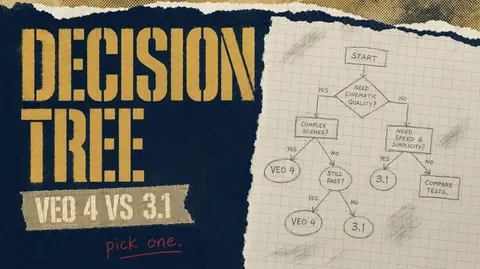
- 1. Veo 4 vs Veo 3.1: A Decision Tree
- 2. Veo vs Seedance 2.0 vs Kling v3 Pro: When Each One Wins
Prompting
- 1. Prompting Veo: Shot Descriptions That Actually Land
Multi-shot
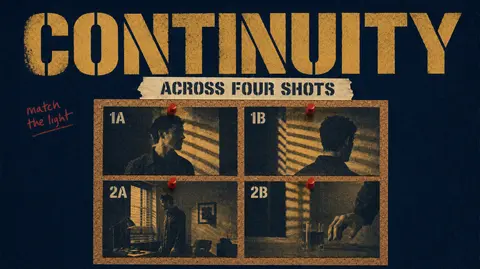
- 1. Multi-Shot Sequences in Veo: Continuity Tricks
Optimization
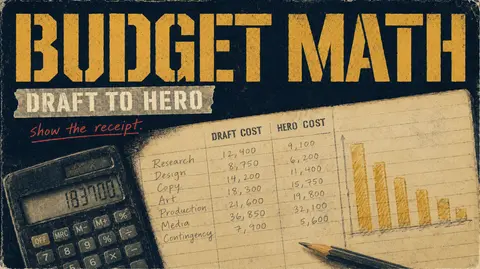
- 1. Veo Pricing Math: Budget a Cinematic Trailer End to End
Technique
- 1. Native Audio in Veo: Dialogue, Ambient, and Lip Sync in One Pass
Use Case
- 1. Generating Ad Creative with Veo: A Two-Stage Pipeline
Workflow
- 1. safety_tolerance and auto_fix: Brand-Safe Veo Pipelines
Troubleshooting
- 1. Debugging Veo Output: Why Your Shot Did Not Land
Integration
- 1. Integrating Veo into a Postgres-Backed Render Farm
More on Comparison.
The category with the most coverage. 2 posts in this thread.
Latest posts.
- Apr 16, 2026 / Technique
Native Audio in Veo: Dialogue, Ambient, and Lip Sync in One Pass
How to get usable dialogue, synced mouths, and ambient beds out of Veo in a single generation, with the caveats you hit when you push past 8 seconds.
- Apr 16, 2026 / Comparison
Veo vs Seedance 2.0 vs Kling v3 Pro: When Each One Wins
A buyer side comparison of the three production ready video models on fal today, sorted by what you are actually trying to ship.
- Apr 15, 2026 / Use Case
Generating Ad Creative with Veo: A Two-Stage Pipeline
A practical workflow for using Veo 3.1 Fast as a prompt lab and the full Veo model as the hero renderer, with the budget math worked out.
- Apr 15, 2026 / Workflow
safety_tolerance and auto_fix: Brand-Safe Veo Pipelines
Two parameters decide whether your Veo pipeline fails loudly or silently rewrites your brand voice. Here is how to configure safety_tolerance and auto_fix.
- Apr 14, 2026 / Troubleshooting
Debugging Veo Output: Why Your Shot Did Not Land
Most Veo shots that miss fail for one of four reasons. Here is the triage checklist that saves a round trip when the render comes back wrong.
- Apr 14, 2026 / Integration
Integrating Veo into a Postgres-Backed Render Farm
One generations table, one JSONB column, a GIN index, and a unique key on request_id. That is the whole schema your Veo render farm needs to stay honest about spend and failures.
The numbers.
What this publication is and isn't, in numbers.
Each one is dated, second-person, and opinionated.
Filter by the constraint you care about.
Total length of every post in the archive.
Not a single U+2014 survives our ship check.
Editor-selected cover stories.
Custom covers on every featured post.
What we write about most.
Keyword frequency across every post. The bigger the word, the more often we come back to it.
Keep reading.The full blog is open.
No gates, no sign-up, no newsletter. Just 10 dated posts on Veo.
Browse the full blog
Sort by date, filter by category, search by keyword.
Prompting Veo: Shot Descriptions That Actually Land
Veo rewards structure. Name the camera move first, the subject second, the light last. Here is the five slot template that cuts rerender cost in half.